From the header to the thank-you page
Detail page, category, search, basket, checkout, wishlist, customer account, header and footer, plus head and scripts. Two positions apply on every page, useful for a notice bar above everything.
Place notices, banners, seals or tables without touching the theme. Content, CSS and JavaScript per block - written by the AI on request, from a single sentence or an uploaded image.
A short look, recorded right in Shopware.
Place notices, banners, seals or tables at 52 fixed points in the shop - maintained in the admin, not in the source. Who sees them and when is decided per block.
Detail page, category, search, basket, checkout, wishlist, customer account, header and footer, plus head and scripts. Two positions apply on every page, useful for a notice bar above everything.
The blocks attach to existing Twig points; your theme stays untouched. No child theme, no compiling, no conflicts with the next Shopware update.
Every block carries its content, its own CSS and, where needed, its own JavaScript. Nothing ends up in a shared file, and deleting the block removes the extras with it.
Describe what the block should show and the AI delivers content, CSS and JavaScript in one go. The instruction is stored on the block and can be refined later.
Up to four images can be attached - a draft, a screenshot of the look you want, an example from a competitor. The AI builds the block from them.
Twig and Shopware variables can be used in content, CSS and JavaScript. Product, sales channel, currency and customer are available at every position, so a block can use the price, the name or the customer group.
Three positions write into the page independently of the theme: at the very top of the head, at the end of the head and right after the body starts. The right place for tracking pixels, fonts or an external script.
A block can be limited to certain page types: home page, category page, product detail page, search results, shop pages and layouts, cart, checkout and confirmation, customer account, wishlist. Without a selection it still applies everywhere.
What used to be a ticket to the agency now takes five minutes in the admin. With the AI, one sentence is enough to get the CSS too.
Over the years special cases pile up in the theme until nobody dares to update. Blocks are individually visible, individually switchable and individually removable.
A block can appear from one date and disappear on another. The Christmas notice does not have to be removed by hand in January.
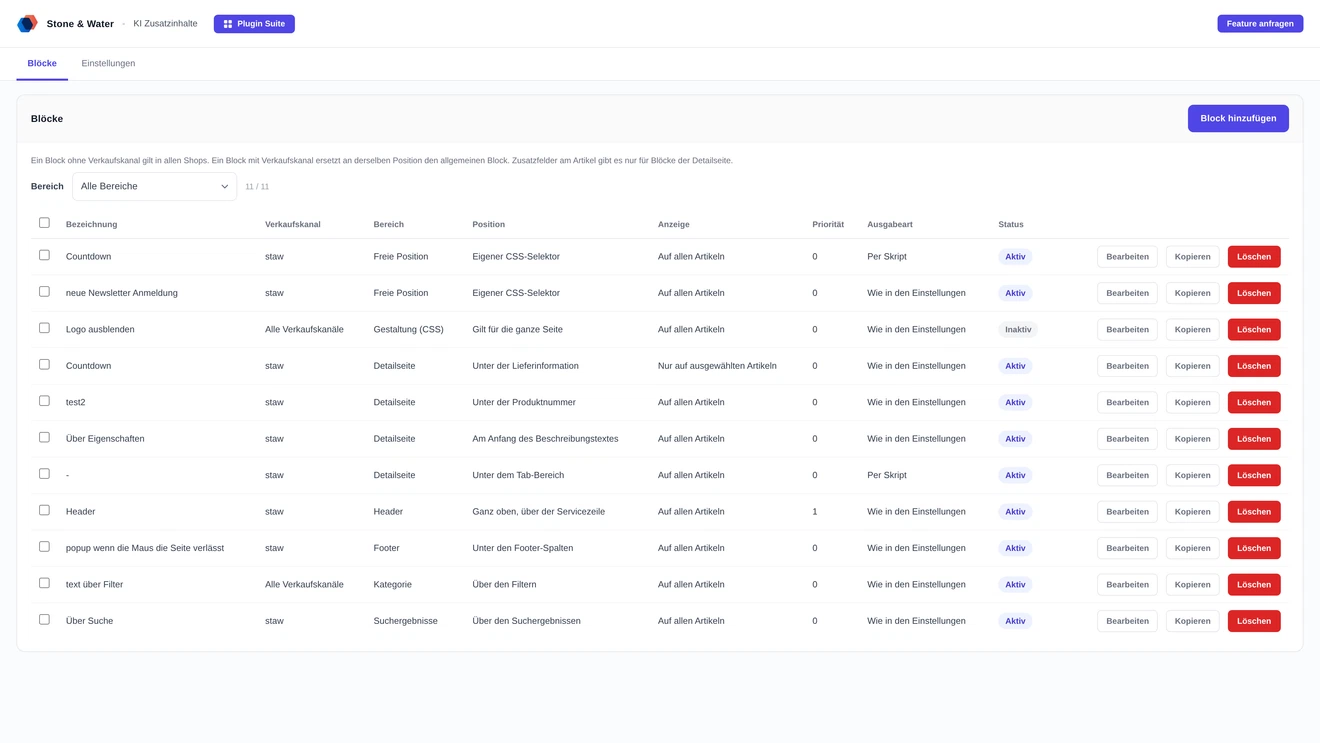
Sales channel, article, category, device, period and order - every block carries its own rules.
A block applies to one channel or to all of them. The B2B shop gets its notice, the consumer shop does not.
All articles, a list of article numbers, a dynamic product group or selected categories. Article numbers can be pasted as a list instead of being searched one by one.
Selectable per block, in combination too. A wide comparison block can appear on desktop and be left out on phones.
When several blocks sit at the same position, the priority decides which comes first.
Normally the block is written straight into the page. If your theme replaces the same Twig blocks, the second mode places it by script instead. Selectable globally and deviating per block.
The list filters by area and pages in 25 entries. Several blocks can be activated, deactivated or deleted at once.
The blocks live in their own tables with translations per language. Installed by upload in the admin, without SSH.
Earlier versions created a custom field on the article per block. The assignment now sits on the block itself - the article master data stays untouched and exports are not bloated.
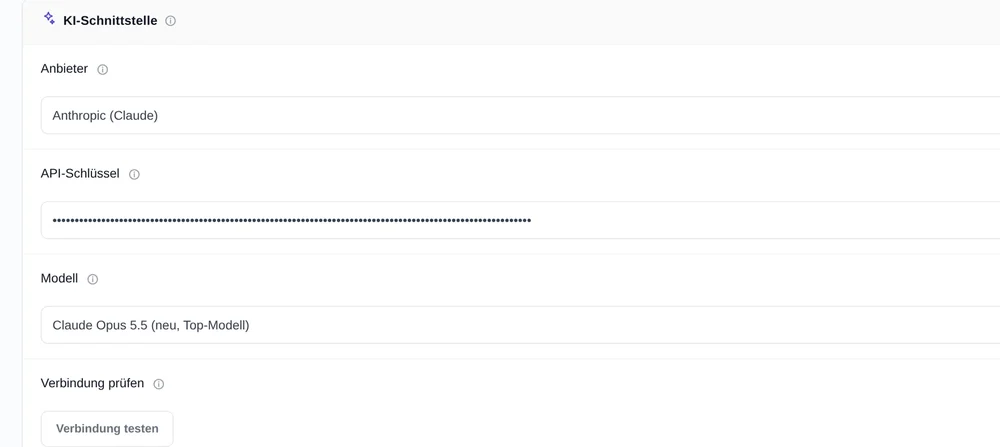
You store your own key with OpenAI, Anthropic, Google or Mistral. It is kept server side and never delivered to the browser; a connection test verifies access beforehand.
The Twig extension copes even when the service container still stems from the previous version after an update. Such an in-between state used to take the storefront down.
The content is stored per language. A block can therefore read differently in the German channel than in the English one, without maintaining two blocks.
Your own content in the shop and what to keep in mind.
Yes, that is exactly what the plugin is for. The blocks attach to existing Twig points and your theme stays untouched. No child theme is needed and nothing has to be compiled.
At 52 positions, grouped into areas: head and scripts, detail page, category and search, basket and checkout, wishlist and customer account, header and footer. Two positions apply on every page. Each block can also be limited to individual page types.
Plain text is enough for simple notices. For anything else you describe in one sentence what the block should show, and the AI delivers content, CSS and JavaScript together. You can also attach up to four images as a template.
Yes. Twig and Shopware variables work in content, CSS and JavaScript. Product, sales channel, currency and customer are available at every position, so a block can insert the article name or the currency symbol.
Yes, a period can be set per block. It appears from one date and disappears on another by itself, so a campaign notice does not have to be removed by hand.
Usually one of the rules: is the block active, does the sales channel match, is today within the time window, does the device selection fit? If it still does not show, your theme may replace the same Twig block. For that case a second output mode places the block by script.
Buying directly costs 24.99 euros net per month or 254.90 euros net per year. Paying yearly saves 15 percent. All prices are exclusive of VAT.
You store your own access with OpenAI, Anthropic, Google or Mistral and are billed directly there. The plugin is fully usable without AI; blocks can be maintained by hand.
Two routes, the same feature set - pick whichever suits your setup.
All prices net, plus VAT.
You buy the licence directly from us and receive an invoice from us. Installation by upload in the admin without SSH, updates through our licence platform, support straight from the developer.
The plugin will be listed in the official Shopware Community Store. Installation and automatic updates then run through the plugin manager in the backend, billing through your Shopware account. We will link it here as soon as it is available.