Sentence becomes search order
"Trousers in red and T-shirts in blue, all in size XS" becomes two separate search orders with category, colour and size. You decide how many product types one query may be split into.
Free-text queries such as "red trousers in XS under 80 euros" are translated into a structured search order - category, colour, size, price, sorting - which then runs against Shopware's classic search index. No chatbot, no invented prices, every hit traceable.
Two short videos: how your customers search in the shop, and how you analyse search in the administration.
Most AI searches answer by themselves - and invent prices, availability and sometimes whole products along the way. Here the AI does exactly one thing: it understands what the customer means and turns that into a search order. The search itself runs as it always did.
"Trousers in red and T-shirts in blue, all in size XS" becomes two separate search orders with category, colour and size. You decide how many product types one query may be split into.
The search page shows how the query was understood. Every building block can be removed with a click, so the customer corrects the search instead of retyping it.
If the provider fails or the answer takes too long, keyword recognition detects colour, size, price and sorting without AI. The search never stops.
Classic only, AI from two words, automatic, or always AI. You decide when a call happens at all.
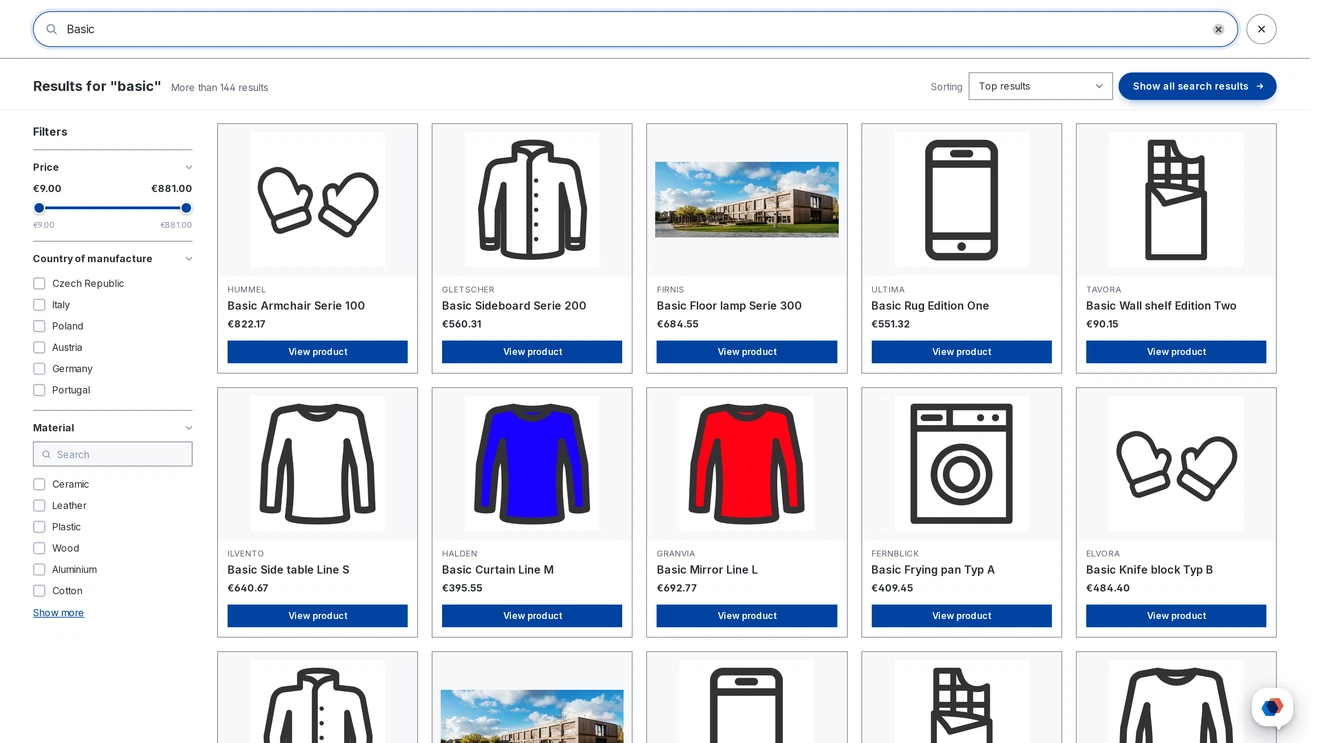
Instead of the narrow suggestion list, a full-width panel opens with its own search field and a softly blurred background. The Shopware standard remains available.
Product boxes as in the listing, or a compact list with image, name and price. The boxes follow the shopping experience layouts - standard with buy button, minimal, large image or compact. Products per row are set separately for desktop, tablet and phone.
The panel can open before the first keystroke, with your own suggestions and products in the chosen order. Optionally the popular searches from your own log, with an exclusion list for terms that do not belong there.
The panel has a filter column on the left: category, manufacturer and a price slider, plus property groups such as flavour or size. You decide which filters appear and in what order - without a selection the three most common groups are used. Per filter you choose the presentation: list, select field or slider, collapsed if you prefer.
Selected filters appear as chips above the results and can be removed one by one. Matching categories are additionally offered as clickable suggestions with hit counts.
The filter column becomes a clear button with the sorting below it. Groups can be expanded, the sliders are larger, and the header stays tidy.
On the phone the panel covers the whole screen, even with the keyboard open. The page no longer scrolls behind it, swipe gestures glide out smoothly, and a button inside the field clears the input.
Scrolling loads further hits, up to 120 products. A back-to-top button returns to the start.
Hits appear in the plugin's own product tile, independent of the theme - optionally with a buy button and availability. Variants of the same article sit next to each other instead of below.
When the search finds nothing, the panel shows recommendations instead of an empty page: either from a dynamic product group or from a selection you put together yourself, with matching search suggestions as chips.
A pre-warmed cache makes filter clicks instant, phonetics finds results despite different spellings.
Cologne phonetics catch spellings that sound alike, so different attempts lead to the same result. If the search finds nothing, the product name is searched as well.
On request one tile appears per article instead of one per variant - even when the parent is missing from the sales channel or switched off. The number of tiles stays the same while sorting and filtering, the hit count counts articles rather than variants, and sorting by price follows the price shown on the tile.
Two extra switches: tiered prices can be left out of the price sorting, and the parent product's name can be included in the search.
A schedule of its own warms the cache and keeps the search index current. How far it reaches is up to you: from the most common filters to every property group with all its values. After that, filter clicks work without waiting.
The cache is warmed not only for filters, but also for your customers' most frequent search terms, for the intermediate stages while typing, and for the channel's manufacturers. Whatever is searched often is there at once.
One call to a fast model costs a fraction of a cent. To make sure that never turns into a surprise, the plugin brings several brakes.
A daily limit for AI calls, after which the search continues with keyword recognition until midnight. Plus a per-visitor limit within ten minutes, counting the search page and the live search together.
Search engines, crawlers and scripts get keyword recognition and cause no costs.
Identical queries are answered for a configurable number of hours without a new call. The overview shows how many searches were served that way.
Enter the price per million tokens your provider charges and the overview converts consumption into euros.
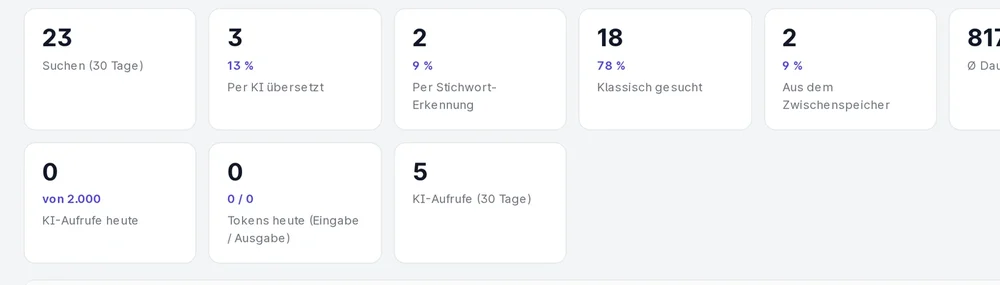
The search log records every search, classic ones included. That gives you a picture of what your customers actually type - and where your range fails to answer.
Searches of the last 30 days, split into AI-translated, keyword-detected and served from cache. Plus average duration, queries without hits and AI failures with fallback.
Optionally it is recorded whether a result was clicked: click rate, click position and searches without any click. The latter are usually more revealing than those without hits.
If your customer says "slacks" and your shop says "trousers", you create a rule. Synonyms are kept as a table with a test, and a rule can be created straight from the list of searches without hits.
Single queries are checked in the search test - with and without AI, per sales channel. The batch test takes up to 50 queries at once and shows how many of them return hits.
One package for Shopware 6.6 and 6.7. Every setting can be made per sales channel; otherwise a channel inherits the default values.
Provider, model, key and time limit are yours to set - the key stays in your shop. The fast, inexpensive models are recommended; larger ones bring little benefit here. Without a provider only keyword recognition runs.
Two routes, the same feature set - pick whichever suits your setup.
All prices net, plus VAT.
Download the free Plugin Suite and upload it in the admin, no SSH needed. It installs and updates the plugin with one click. You buy the licence directly from us, with an invoice from us and support straight from the developer.
The plugin will be listed in the official Shopware Community Store. Installation and automatic updates then run through the plugin manager in the backend, billing through your Shopware account. We will link it here as soon as it is available.
No. It only formulates the search order; the search runs on the Shopware index. What is not in the shop cannot appear.
Then keyword recognition takes over colour, size, price and sorting. The search keeps working, just less precisely.
Yes. You choose the provider and model yourself and store your own key. Costs and data stay with you.
One small call per search. With the cache, a daily limit, a per-visitor limit and bot exclusion this can be kept tight.
Yes. Tested from 6.6.0 up to the current 6.6.10.28 and on 6.7.
By default yes. Each channel can have its own values and can be reset to the default at any time.