What was bought together
The most reliable source is order history: which products were actually ordered together. A minimum number of shared orders and a look-back period control how strictly it filters. Genuine co-purchases count triple.
The item being viewed plus fitting partners, with a total price and one button for the whole set. Built from order history and catalogue, reviewed by you, optionally with a discount - and placed exactly where you want it on the product page.
Short videos recorded right in the shop and the Shopware admin.
Order history and catalogue produce product sets: the item being viewed plus fitting partners, with a total price and one button that puts everything in the basket at once. What appears in the shop is approved by you first.
The most reliable source is order history: which products were actually ordered together. A minimum number of shared orders and a look-back period control how strictly it filters. Genuine co-purchases count triple.
For new products the plugin evaluates which items visitors view within one visit. Only product pairs with a counter are stored - no cookies, no visitor data. Bots are discarded.
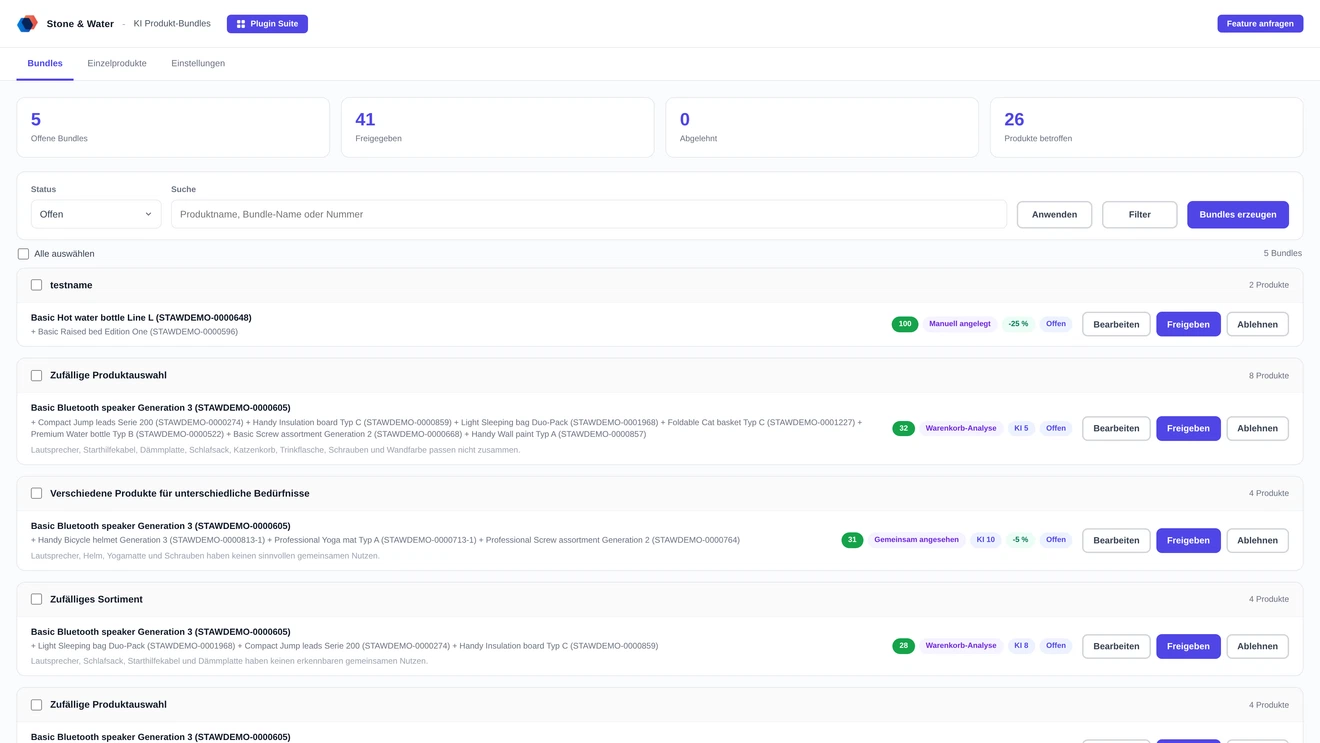
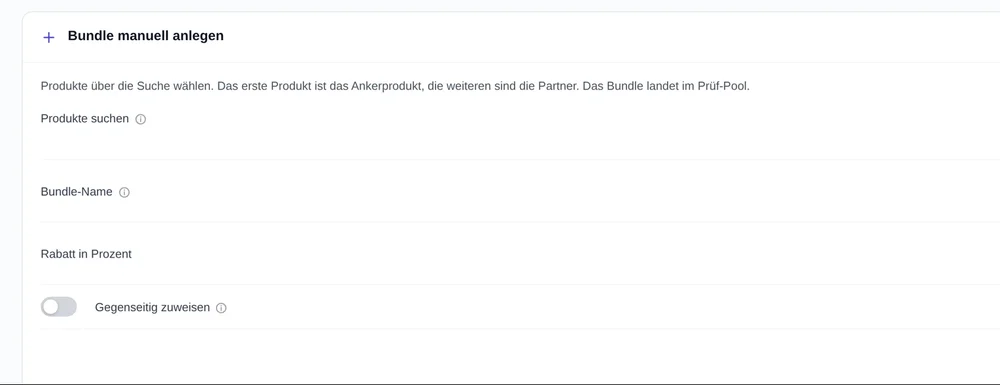
Through the product search, sets can be created without any analysis: pick the products, choose the anchor, done. They go straight into the review pool, carry the source "created manually" there and can be found through the source filter.
Generated sets land in the review pool. Only approved ones appear in the shop. Deactivating takes a set back without losing its name, text or discount.
At the top of the buy box, below the buy box, above or below the description text. "Do not display" hides the box without deleting the generated sets.
On request a set appears not only on the anchor product but also on the pages of its partners - where the anchor is shown as an equal member. Configurable globally and additionally per set.
Wrapping shows four products per row, two on tablets, one on phones. The slider keeps everything in one swipeable row, with arrows on desktop. The list gives every product the full width - the calmest form for large sets.
Instead of a percentage, a fixed deduction in the shop currency can be stored per set, for example 5 for five euros. A value above zero wins over the percentage and never exceeds the set total.
You decide what happens when a product in the box is tapped: quick info in a modal with image, article number, price and short description, the product page in a new tab, the product page in the same tab, or nothing. The anchor product is never linked.
On request an AI model reviews every set, assigns a score and writes a short sales headline. Sets below the minimum score never even reach the review pool.
Maintaining sets by hand is worthwhile with ten articles. From a hundred it gets left undone - and goes stale as soon as the range changes.
A visible set with a single button lowers the hurdle. Instead of searching for three products one by one, the customer adds them in one step.
The sets come from your data, not from a list somebody has to keep current. A scheduled run produces fresh suggestions regularly.
The maximum price limits how expensive a partner may be relative to the anchor product. At 60 percent, a 100 euro article only gets partners up to 60 euros - producing sets with accessory character rather than arbitrary pairings.
Size, count, sources, limits and discount are each configurable - and the diagnosis tells you why something is not taking effect.
Products per set and sets per product are freely selectable. Sets do not overlap: a partner already used in one set does not reappear in the next.
The normal run takes the strongest products from order history. In the Individual products tab you pick articles deliberately - sets are created for them without that limit, even with thin history.
Vouchers, spare parts, shipping articles or entire brands can be kept out completely - they become neither anchor nor partner. The exclusion applies both when generating and when displaying.
Switched off by default. When active it applies as soon as all products of an approved set are in the basket. A deviating percentage or fixed amount can be set per set, plus a minimum set value. The amount of the discount line can be hidden in checkout, globally or per set.
For a single run all sources are used, minimum values drop to one, price ratio and minimum AI score are suspended and the period widens to two years. Exclusions and stock still apply, and the saved settings stay untouched.
Enter an article number and the check names which sets appear on that page - and for the rest, the reason why not. It uses exactly the same matching as the shop itself.
Another run for the same product creates additional sets; identical combinations are merely updated. How many of them appear in the shop is set by "maximum bundles shown". A filter in the review pool shows exactly the products with several sets.
Filtering works by source, category, property and manufacturer. Active filters appear as removable chips below the bar, and a counter shows how many are currently applied.
"Select all" and "Approve selection" set discount, mutual assignment, layout and collapsed state for every selected set in one go - and approve them in the same step.
Layout, variant inheritance and the collapsed state can be set per set, deviating from the global configuration. "Global setting" takes the value back again.
Show unit price puts the Shopware unit price below the price, for example the price per litre - it only appears for products that carry a content declaration. Strike price in red shows the crossed out original price in red; when off it stays grey.
Whether a set also appears on the variants of the anchor product can be set per set, on top of the global setting. Set to off it stays with the exact product it was created for, which is how a set for a single variant works.
The discount row in the cart gets its own image - globally for all sets in the settings or per set. An image on the individual set takes precedence over the global choice. Without a selection the Shopware placeholder stays.
A check in the admin names the concrete reason why a combination of article numbers gets no discount: switch off, unknown number, no approved set, missing product or a percentage of zero.
A generation run can be handed to the queue and continues server side, even with the browser closed. A slim bar shows the state; interrupted runs are picked up again automatically.
The sets live in their own tables, the discount is created as a regular basket line item. Installed by upload in the admin, without SSH.
The anchor product is internally raised to the parent product so the box appears on every variant. The partners stay concrete, purchasable products - otherwise the button could not work.
The discount appears as its own basket line and is determined afresh on every recalculation. If a product of the set leaves the basket, it disappears automatically. Each product counts towards one set only, so double discounts are ruled out.
On approval, rejection, deactivation, editing or deletion the affected product pages are removed from the cache specifically - those of the anchor product and all partners, variants included. Changes are visible in the shop immediately.
The lookup of sets for a product runs through a dedicated mapping table with an index rather than across all sets. On variant pages one additional query is avoided.
Customers can enter a quantity per product; the total recalculates at once, including the struck price and the saving. If a product in the set is a variant, a selector appears - price, struck price and cart follow the choice. The discount also applies when a different variant of the same product is in the cart.
Tiles are of equal height, so quantity and variant line up across all products - even when not every product has a variant selector.
Every setting can be made per sales channel, and within a channel per language. A chain icon on each field shows whether it inherits or carries a value of its own; a click switches it. Anything that does not differ is not stored separately at all.
Headline, description and button text of the box are available per level and language. Empty fields inherit in this order: channel and language, general and language, language-independent, and finally the shop's own snippet.
The saving can be shown as a money amount instead of a percentage, even with a percentage discount. Discounts per bundle remain possible as a percentage, an amount or a final price.
You store your own API key. It is kept server side and never delivered to the browser; a connection test verifies access beforehand.
The "viewed together" source sets no cookies and stores no visitor data. Only product pairs with a counter are recorded, and bots are discarded.
Product sets in the shop and what to keep in mind.
From your own data: first from real orders, meaning which products were actually bought together. If the history is thin, items viewed together, shared categories and properties are added, and the category bestsellers as a last resort.
No. Generated sets land in the review pool first and only appear after you approve them. If you prefer, automatic approval from a minimum score can be enabled.
Yes. Through the product search you pick the products and choose the anchor. The set goes into the review pool without analysis and without AI.
At one of four positions: at the top of the buy box, below the buy box, above or below the description text. Wrap, slider and list are available as layouts.
Only if you want one - the set discount is switched off by default. When active it applies as soon as all products of an approved set are in the basket, optionally with its own percentage or fixed amount per set.
Buying directly costs 14.99 euros net per month, 74.99 euros net per half year or 134.99 euros net per year. Paying annually saves around 25 percent. All prices are exclusive of VAT.
The "check display" tool answers that in one go with an article number: it names the sets that appear there and, for the rest, the reason why not. Clearing the cache is not necessary; the plugin handles that itself.
AI scoring is optional. If you use it, you store your own access with the provider and are billed directly there. Without AI the sets are still built from order history and catalogue.
Two routes, the same feature set - pick whichever suits your setup.
All prices net, plus VAT.
You buy the licence directly from us and receive an invoice from us. Installation by upload in the admin without SSH, updates through our licence platform, support straight from the developer.
The plugin will be listed in the official Shopware Community Store. Installation and automatic updates then run through the plugin manager in the backend, billing through your Shopware account. We will link it here as soon as it is available.